

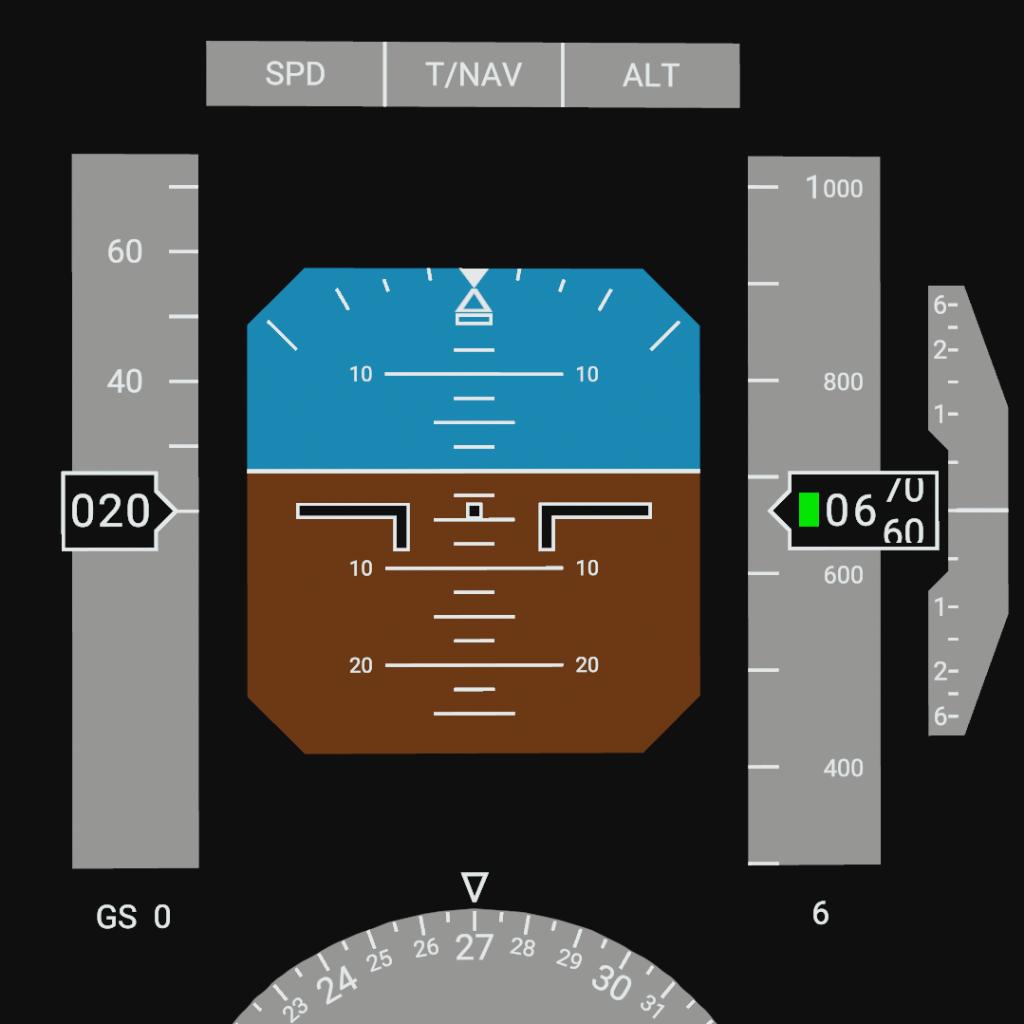
Please use the latest version of the PFD
Introduction
The Primary Flight Display (PFD) is a crucial piece of modern avionics that allows pilots to operate the aircraft efficiently.
I've strived to make my rendition as realistic as possible, however, due to certain game mechanics and necessary simplifications, it differs noticeably from its real-world counterparts.
Description
For the latest PFD version
The PFD consists of the following parts:
1. Attitude Display
The Attitude Indicator (Artificial Horizon) allows pilots to determine the aircraft's orientation in space, including its pitch, bank angle, and sideslip.

The bank angle scale has markings at 10, 20, 30, and 45 degrees in each direction. If the bank angle exceeds 35 degrees (by default), the indicator turns yellow and becomes filled. At maximum sideslip, the slip indicator becomes fully filled.

2. Airspeed Display
The Airspeed Indicator is located on the left side of the PFD and displays the aircraft's current Indicated Airspeed (IAS) in knots. Additionally, it shows the speed the aircraft will reach in 5 seconds (by default) – the Speed Trend Vector – as well as target, maximum, and minimum speeds, and the ground speed / Mach number.

The maximum and minimum airspeed values are only displayed during flight. When the Mach number exceeds 0.4, the ground speed readout is replaced by the current Mach value.
The displayed airspeed range is from 20 to 980 knots.
3. Altitude and Vertical Speed Displays
The Altitude and Vertical Speed indicators are located on the right side of the PFD.
The Altitude Indicator displays the current altitude in feet above sea level, the target altitude, and the radio altimeter height, which is shown when flying within 2000 feet of the ground.
The Vertical Speed Indicator shows the aircraft's rate of climb or descent in feet per minute. The digital vertical speed value does not appear when the rate is below 400 feet per minute.

The displayed altitude range is from 0 to 90,000 feet.
The displayed vertical speed range is from 0 to ±6,000 feet per minute.
4. Heading Display
The Heading Indicator displays the aircraft's current and target heading.

5. UI
The Flight Mode Indicator is an interactive element consisting of three indicator buttons:
The left "SPD" button allows you to set the target airspeed and enable its display on the Airspeed Indicator.
The right "ALT" button allows you to set the target altitude and enable its display on the Altitude Indicator.
The center "T/NAV" button allows you to enable the Target Navigation mode.

The T/NAV mode is a conditional in-game navigation aid that helps the player fly towards a target in a director (semi-automatic) mode.
Select a target (whether it's a craft or a location) and press the button. To fly towards the selected target, you need to align the purple cross on the Airplane Indicator.
6. Warnings
The PFD features two warnings: PULL UP and STALL. Each has its own aural alert and can only be activated during flight.
The PULL UP warning is triggered if the aircraft is predicted to impact the ground within 8 seconds (by default). This warning takes priority over the STALL warning.
The STALL warning is activated when the aircraft's airspeed falls below the minimum level.
Usage and Customization
All aircraft are different – from small, slow crop-dusters to large, fast airliners. Therefore, the PFD program is designed for customization.
To begin, place the display in the desired location on your craft, then use the Width and Height sliders to adjust its size.
Then, open the display's program and adjust the parameters shown in the image below to fit your needs.

Feel free to use this PFD in your own creations! I would be happy to receive your feedback.
P.S. This PFD is planned to receive updates from time to time, so please make sure to use the latest version, which can be found at the link at the beginning.
GENERAL INFO
- Predecessor: Horizontal Situation Indicator
- Created On: Windows
- Game Version: 1.3.204.1
- Price: $234k
- Number of Parts: 2
- Dimensions: 1 m x 1 m x 1 m
PERFORMANCE
- Total Delta V: 0m/s
- Total Thrust: 0N
- Engines: 0
- Wet Mass: 210kg
- Dry Mass: 210kg
STAGES
| Stage | Engines | Delta V | Thrust | Burn | Mass |
|---|
12 Comments
- Log in to leave a comment
-
-
5,183 IcEStaR4 months ago
@ZenithYT Thank you! Yes, in the near future, I plan to create a radar display and an aviation navigation display (with radar and flight planning functionality). I'm also interested in creating a HUD and several other versions of the PFD.
-
1,058 ZenithYT4 months ago
I loved it!!! Can we get more displays like this? The one like Navigation displays, or that display which shows engine performance etc.
I truly loved this! -
6,086 Livingg0174 months ago
this is one of the systems i wanted to install on my F-04 Razorblade on its way to become the most technologically advanced fighter ingame, however no one had made the system so i can now improve its capabilities, thank you for llowing me to develop my craft further, i will try to implement this the next time i update the craft, but i cant promise nothing as the craft has so much vizzy it may even work as it shouldnt
-
2,863 AlphaSpaceTechnologies+1 4 months ago
Now the airliners i shoot down will have more realism!!!🔥🔥🔥🔥🗣🗣🗣🗣
-
-
3,160 JLaerospace4 months ago
This is so great! I feel like it would perfectly fit my LX airliners, so I'll integrate them into my systems if I expand the series
-
5,183 IcEStaR4 months ago
@MoTi Thanks a lot! And you're absolutely right, that craft is truly legendary (4к parts!). An MFD is a fantastic thing, but unfortunately, my programming skills aren't the strongest. However, with every new craft, I try to make it better than the last.
This particular PFD will be updated from time to time, so please keep an eye out for the latest version (which, by the way, is already available!). -
450 MoTi4 months ago
Thank you for the wonderful device! It's getting more and more interesting to play! you can watch the 4096px MFD, with 4095 less parts! s5ehfr9 did it 5 years ago and no one else tried to improve it ! with your skills, we won't even need Simple Plane 2 :)
-
-


@kemnoylovesoroes I might release it by the end of this year, but for now, I'd like to take a break.